RightFont
Professional font manager for Mac that designers actually enjoy using.
Need an MVP like RightFont?
We'll build it in less than 7 days. Book a free discovery call with Tiny Startup Studio.
Book free discovery call →Quick summary of RightFont
RightFont is a Mac-native font manager for designers + creative professionals — handles font activation/deactivation on demand (reducing system load from too many active fonts), organizes font libraries with tags + collections + custom search, previews fonts in custom contexts (text + size + color + background), syncs fonts across team members + devices via cloud, and integrates with Adobe Creative Cloud + Figma + Sketch + design tools for automatic font activation when opening files. Distinguished from native macOS Font Book (inadequate for professional workflows with large font libraries) by professional features + organization + integration, distinguished from FontExplorer X by Linotype ($79 one-time, Mac + Windows established gold standard) by modern Mac-focused approach + current macOS optimization, distinguished from Suitcase Fusion by Extensis ($99/yr, corporate-favored alternative) by one-time purchase model + designer-focused vs corporate IT focus, distinguished from Fontbase (free + Pro $29 one-time, rising cross-platform competitor) by Mac-specific optimization + Adobe CC integration depth. For Mac-based designers + creative professionals with large font libraries (500+ fonts) experiencing performance issues from native Font Book + Adobe font activation, RightFont is competitive font management app 2026. Core features: Mac-native app for macOS (Apple Silicon + Intel supported), font activation/deactivation on demand to reduce system load + improve Mac + Adobe app performance, font library organization with tags + custom collections + smart collections via rules, font preview with custom text + sizes + colors + backgrounds for in-context evaluation, comparison views + side-by-side font browsing for pairing decisions, search across font names + tags + foundries + classifications, font classification (serif + sans-serif + display + script + monospace + etc.), Adobe Creative Cloud integration (Photoshop + Illustrator + InDesign + XD + auto-activation when opening Adobe files), Figma integration for font activation matching design work, Sketch integration, other design tool integrations (varies), font library import from Adobe Fonts + Google Fonts + custom font folders + system fonts, team syncing across team members (Team tier — shared font collections + activation states via Dropbox/Google Drive/iCloud or RightFont's own sync), version control for font libraries, font usage analytics (which fonts used in which projects), favorite fonts + recently used fonts, glyph preview + character map viewer, font information (foundry + license + technical metadata), keyboard shortcuts for power users, dark mode + light mode UI, regular macOS feature updates + Adobe CC compatibility maintenance, lifetime updates on Personal tier (one-time purchase typically), priority support on Team. Best for Mac-based designers + creative professionals with large font libraries (500+ fonts where native Font Book + automatic font activation become inadequate for professional workflows due to performance issues), agency + studio designers needing team font syncing across multiple designers + projects (Team tier ensures everyone has same fonts for shared client work), Adobe Creative Cloud users frustrated by Adobe's font activation behavior (RightFont's integration auto-activates fonts when opening Adobe files preventing 'missing fonts' issues), designers wanting cleaner organization than Font Book (tags + collections + search across thousands of fonts), creative professionals where font management workflow time matters (saves minutes per design session × many sessions = significant time recovery), professional font collectors + typography enthusiasts maintaining curated font libraries across projects + experiments, brand designers + identity studios with specific font collections per client + project. Skip for Windows-based designers (RightFont is Mac-only — use FontExplorer X or Suitcase Fusion for cross-platform or Windows-specific font management), small font libraries (< 200 fonts where Font Book + Adobe Fonts activation suffice without paid font manager), enterprise environments with established Suitcase Fusion deployments where switching costs + IT requirements matter, users wanting free font management (Fontbase free tier solid alternative for cross-platform + budget-conscious users), users uncomfortable with one-time purchase pricing model (verify current RightFont pricing model — subscription vs one-time has shifted over years), users primarily working in browser-based tools without local font installation needs (web fonts via Google Fonts + Adobe Fonts subscription handle some use cases without local management). Pricing: Free 14-day trial with all features for testing + personal use; Personal estimated $45 one-time for single user license + all features + lifetime updates + email support; Team estimated $100/yr for team font syncing + shared collections + Adobe + design tool integration + priority support; verify current pricing on rightfontapp.com as font management app pricing has shifted between one-time + subscription models. Direct competitors: FontExplorer X by Linotype ($79 one-time, Mac + Windows established gold standard), Suitcase Fusion by Extensis ($99/yr, corporate-favored alternative), Fontbase (free + Pro $29 one-time, rising cross-platform competitor with generous free tier), Connect Fonts by Extensis (cloud-based font management), Adobe Fonts (within Adobe CC subscription, less control but bundled), Typeface (newer Mac font manager), Glyphs Mini ($45-99, type design tool with management features), macOS Font Book (native free, basic), system font + manual management (DIY approach). RightFont wins on Mac-focused modern app + Adobe CC integration + clean designer UX + one-time purchase pricing; FontExplorer X wins on cross-platform + established gold standard reputation; Suitcase Fusion wins on enterprise + corporate IT integration + Connect Fonts cloud sync; Fontbase wins on free tier + cross-platform + Pro accessibility; Adobe Fonts wins on Adobe CC integration + bundled subscription. For Mac-native font management in 2026, RightFont remains competitive option for designers with large font libraries.
⏱ 30-second verdict
About
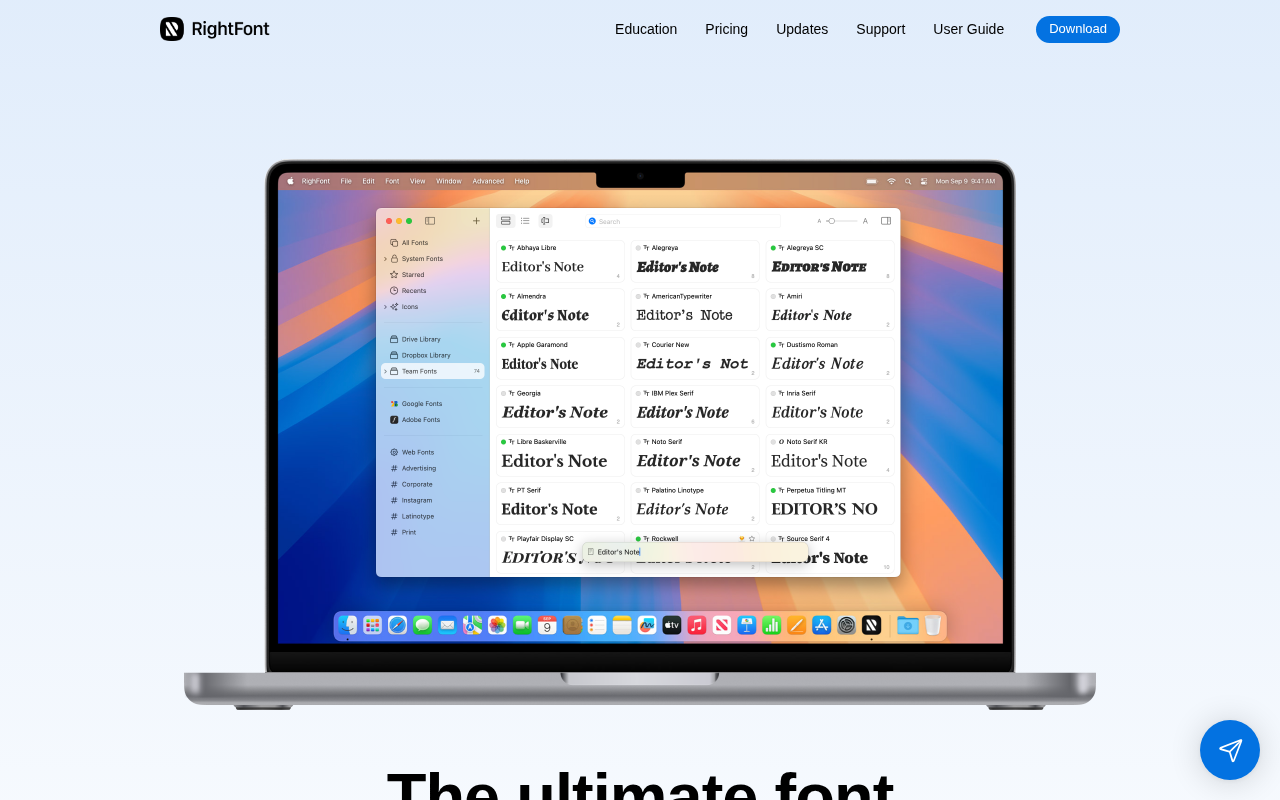
RightFont is a lightweight font management app for macOS that lets you preview, sync, and organize fonts with ease. It integrates directly with Adobe Creative Cloud, Sketch, and Figma, allowing you to activate fonts on-the-fly without restarting apps. Supports Google Fonts, Adobe Fonts, and font syncing via Dropbox or iCloud.
🎯 Why it's useful
Startup design teams can maintain consistent typography across projects without cluttering their system with hundreds of installed fonts, saving time and keeping creative workflows smooth.
💜 Our take
It's fast, minimal, and stays out of your way—unlike clunky enterprise font managers. The drag-and-drop organization and instant font preview make finding the right typeface actually enjoyable.
How indie founders use RightFont
Mac designer font management
Manage 500+ font libraries without Mac performance hit. Activate only fonts needed per project.
Adobe CC integration
Auto-activate fonts when opening Adobe files. No more 'fonts missing' issues during design work.
Agency + studio team sync
Sync fonts + collections across team. Everyone has same fonts for shared projects.
Font library organization
Tags + collections + search beyond Font Book. Find right font fast across thousands.
RightFont is a Mac-native font manager for designers — install + uninstall fonts on demand, organize font libraries with tags + collections, preview fonts in custom contexts, sync fonts across team members + devices, and integrate with Adobe Creative Cloud + Figma + Sketch + design tools. The pitch: professional designers have hundreds or thousands of fonts but native macOS Font Book is inadequate for managing this volume. What it does: font management Mac app that handles activation/deactivation (only activate fonts when needed to reduce system load), font organization with tags + collections + search, font preview with custom text + sizes + colors + backgrounds, comparison views + side-by-side font browsing, syncing across team members via Dropbox/Google Drive/iCloud or RightFont's own sync, integration with Adobe Creative Cloud (Photoshop + Illustrator + InDesign), Sketch, Figma, and other design tools (auto-activate fonts when opening files needing them), and font library import from Adobe Fonts + Google Fonts + custom font folders. Honest comparison: FontExplorer X (Linotype, established Mac/Win font manager, $79 one-time) was the long-time gold standard. Suitcase Fusion (Extensis, $99/yr) is the corporate-favored alternative. Fontbase (free + Pro $29) is the rising free competitor. RightFont positions as modern Mac-focused alternative at one-time-purchase pricing. The professional font management problem is real. Designers with 1,000+ fonts experience slow boot times + Adobe app launches if all fonts are active. Activating only needed fonts dramatically improves performance. Native Font Book + automatic font activation are inadequate for professional workflows. Who should use it: Mac-based designers + creative professionals with large font libraries (500+ fonts), agency + studio designers needing team font syncing across designers + projects, Adobe Creative Cloud users frustrated by Adobe's font activation, designers wanting cleaner organization than Font Book, and creative professionals where font management workflow time matters. Where to look elsewhere: Windows-based designers (RightFont is Mac-only — use FontExplorer or Suitcase Fusion), small font libraries (< 200 fonts, Font Book + Adobe Fonts activation suffice), enterprise environments with established Suitcase Fusion deployments, and users wanting free font management (Fontbase free tier solid alternative). Pricing: typically $40-80 one-time purchase or subscription. Verify current pricing on rightfontapp.com.
Pricing
Free Trial
- ✓14-day trial
- ✓All features
- ✓Personal use
- ✓Test workflows
- ✓Time-limited
Personal
- ✓Single user license
- ✓All features
- ✓Lifetime updates included
- ✓Email support
- ✓Verify pricing
Team
- ✓Team font syncing
- ✓Shared collections
- ✓Adobe + design tool integration
- ✓Priority support
- ✓Verify pricing
Free trial · $59 one-time purchase per device
Frequently asked questions
Is RightFont free?
Free 14-day trial. Paid plans estimated $45 one-time Personal or $100/yr Team. Verify current pricing on rightfontapp.com — font management apps have shifted between one-time purchase + subscription models over the years.
RightFont vs FontExplorer X?
FontExplorer X by Linotype was the long-time gold standard ($79 one-time, Mac + Windows). RightFont is modern Mac-focused alternative. Pick FontExplorer for cross-platform; RightFont for Mac-only modern app focused on current macOS.
RightFont vs Fontbase?
Fontbase has generous free tier (free for personal use, Pro $29 one-time) and is cross-platform. RightFont is Mac-only with potentially better integration with Adobe Creative Cloud. Pick Fontbase for free + cross-platform; RightFont if you need Mac + Adobe-specific features.
Why activate/deactivate fonts?
Performance — Mac systems with 1,000+ active fonts experience slow boot times + Adobe app launches. Activating only needed fonts dramatically improves performance. Native macOS Font Book + Adobe font activation are inadequate for professional workflows with large font libraries.
Does it sync fonts across team?
Yes on Team tier — shared font collections + activation state across team members via cloud sync (Dropbox/Google Drive/iCloud or RightFont's own sync). Useful for agency/studio workflows ensuring everyone has same fonts for shared projects.
Reviews
No reviews yet — be the first.
Tools like RightFont
See all Design →Figma
The browser-based design tool everyone uses.
Webflow
No-code site builder that produces real CSS.
Yellow Images
The Largest Collection of PSD Mockups on the Internet!
Wise
The design system of Wise.
Who Can Use
A tool to show how color contrast can affect different people with visual impairments.
Websitevice
Website design examples for inspiration that get results instead of awards