Eagle
Organize all your design files and inspiration in one place.
Need an MVP like Eagle?
We'll build it in less than 7 days. Book a free discovery call with Tiny Startup Studio.
Book free discovery call →Quick summary of Eagle
Eagle (eagle.cool) is a native Mac + Windows desktop asset organizer beloved by designers for managing the chaos of design references, screenshots, image libraries, and creative inspiration at scale. Built for designers with libraries of 10k-100k images who've outgrown Apple Photos + browser bookmarks + Pinterest. Features: native desktop app (Mac + Windows) with performance optimized for large libraries, browser extension for one-click saving from any website (the killer feature — right-click anywhere → save to Eagle with tags), tagging + smart folders + auto-categorization, color search (find all blue-dominant images in your library), full-text search across notes + metadata, multi-format support (PNG + JPG + SVG + GIF + WebP + MP4 video + MP3 audio + 3D files including OBJ/FBX + fonts + PDFs), team libraries via shared local network or cloud sync via Dropbox/iCloud. Distinguished from Pinterest (web-based + algorithmic recommendations + you don't own your saves + smaller file-type support) by local-first ownership + native performance + serious file-type support, distinguished from Are.na (community-curated + lovely UX + public boards + design-world brand) by private mass-reference-management vs community curation focus, distinguished from Notion + Obsidian web clippers (knowledge bases that handle bookmarks alongside notes) by image-organization-first purpose-built UX, distinguished from Apple Photos + Google Photos (photo-focused with limited design metadata) by design-reference-specific tagging + color search + format support, distinguished from cloud-native services (typically subscription + you don't own your data) by one-time purchase + local-first model. Pricing: one-time purchase ~$30 for single device with generous lifetime updates within major versions, family/multi-device + team/business tiers also available; no subscription required (verify current pricing on eagle.cool). Best for serious designers + design teams collecting visual references at scale (Dribbble shots, Behance projects, product screenshots, brand work, image libraries), browser extension users wanting one-click saving from any website with tags, designers building mood boards + project research libraries needing multi-format support across images + videos + audio + 3D files + fonts, and design teams sharing reference libraries via local network or cloud-synced folders as collective team memory. Skip if you have under 200 saved images (free browser bookmarks + Apple Photos suffice), if you want community + curation as part of saving experience (use Are.na or Pinterest), if you want cross-device cloud-native sync without local-first friction (Eagle's local-first model with optional sync may feel like friction), or if you're on Linux (Mac + Windows only). One of the great indie desktop apps of the past decade — recommended without hesitation in 2026 for serious designers + design teams; the kind of software with no enshittification, fair one-time pricing, and a small team that ships consistently.
⏱ 30-second verdict
About
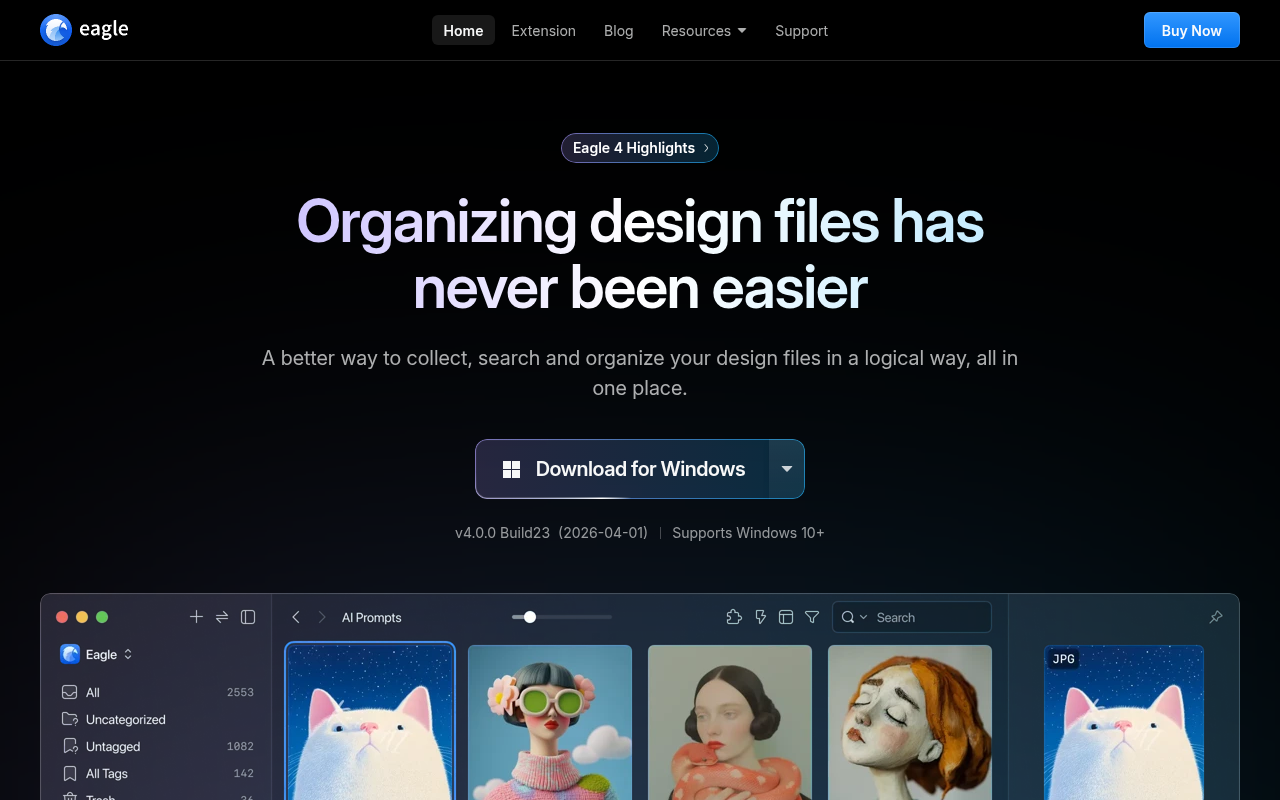
Eagle is a powerful digital asset management tool that helps you collect, organize, and browse images, videos, fonts, and design files. It features smart folders, color filtering, tagging, and supports 90+ file formats including PSD, AI, and Sketch files with instant previews.
🎯 Why it's useful
Founders can build organized inspiration libraries, manage brand assets, and quickly find design references without digging through scattered folders or browser bookmarks.
💜 Our take
The browser extension makes saving inspiration dead simple, and the color-based search is genuinely magical when you're trying to find that one image you saved months ago.
How indie founders use Eagle
Design reference library
Designers collecting visual references at scale — Dribbble shots, Behance projects, product screenshots, brand work — organized into tagged + searchable libraries.
One-click web saving
Browser extension lets you save anything from any website with tags in 2 clicks — Twitter screenshots, Instagram posts, product pages, design inspiration.
Mood board + project research
Build mood boards for projects + client research libraries with multi-format support (images, videos, audio, 3D files, fonts) in one organized place.
Team shared libraries
Design teams sharing reference libraries via shared local network or cloud-synced folder — collective design memory across the team.
Eagle (eagle.cool) is the desktop asset organizer that designers actually love — built for managing the chaos of design references, screenshots, image libraries, and creative inspiration. If your Downloads folder has 8,000 screenshots and you've ever spent 20 minutes hunting for that one Dribbble shot you saved last year, Eagle is the answer. One-time purchase, Mac + Windows native apps, organizes images + videos + GIFs + audio + 3D files + fonts into tagged + searchable libraries with thumbnail browsing. What you get: native desktop app (Mac + Windows) — performance matters because designers have libraries of 10k-100k images, browser extension for one-click saving from any website (the killer feature — see something on Twitter, save to Eagle in 2 clicks), tagging + smart folders + auto-categorization, color search (find all the blue-dominant images in your library), full-text search across notes + metadata, multi-format support (PNG, JPG, SVG, GIF, MP4, MP3, 3D files, fonts, plus more), team libraries via shared local network or cloud sync. Where Eagle shines: design reference management at scale. Pinterest is web-based + recommends content you didn't ask for + you don't own your saves. Are.na is community-curated + lovely but limited in volume + search. Notion + Obsidian web clippers handle bookmarks but aren't image-organization-first. Apple Photos handles photos but not design references. Eagle owns the 'designer's local image library' niche — and the one-time purchase model (no subscription) is part of the appeal. Where it's not for you: if you have 200 saved images and don't need a dedicated tool, free browser bookmarks + Apple Photos suffice. If you want community + curation as part of saving, Are.na or Pinterest fit better. If you want everything in the cloud + cross-device sync, Eagle's local-first model with optional sync may feel like friction (though sync via Dropbox/iCloud works). If you're on Linux, no Eagle for you. Pricing: one-time purchase ~$30 for a single device or modest team licensing — generous lifetime updates within major versions, no subscription required. Verify current pricing on eagle.cool. Honest take: Eagle is one of the great indie desktop apps of the past decade. Solid software, fair pricing, no enshittification, built by a small team that ships consistently. Designers who try Eagle generally don't switch back. The browser extension alone (right-click anywhere → 'Save to Eagle' with tags) is worth the price. If your design reference workflow has outgrown Apple Photos + browser bookmarks, Eagle is the answer. Recommended without hesitation for serious designers + design teams who collect references seriously.
Pricing
Single Device
- ✓Mac OR Windows license
- ✓Lifetime updates within major version
- ✓Browser extension included
- ✓Local-first storage
- ✓Verify current pricing on eagle.cool
Family / Multi-Device
- ✓Multiple devices (Mac + Windows)
- ✓Shared family use
- ✓All features
- ✓Verify on eagle.cool
Team / Business
- ✓Team library sharing
- ✓Shared workflows
- ✓Verify current business pricing on eagle.cool
One-time purchase $29.95 · Free 30-day trial · Lifetime updates included
Frequently asked questions
How much does Eagle cost?
One-time purchase ~$30 for a single device — generous lifetime updates within major versions, no subscription required. Team + multi-device licensing varies. Verify current pricing on eagle.cool.
Eagle vs Pinterest?
Pinterest is web-based + recommends content you didn't ask for + you don't own your saves (lose access if Pinterest changes things). Eagle is local-first + you own your data + faster + no algorithmic recommendations + supports more file types. Pick Pinterest for community + discovery; pick Eagle for serious reference management at scale.
Eagle vs Are.na?
Are.na is community-curated with public boards + strong design-world brand + research-oriented + lovely UX. Eagle is private + local + focused on managing large personal libraries. Pick Are.na for community + sharing + curated research; pick Eagle for private mass reference management.
Does Eagle sync across devices?
Eagle is local-first but you can sync libraries via Dropbox + iCloud + other cloud services by storing the library in a synced folder. Not as seamless as cloud-native sync but works well for designers who want local-first ownership with optional sync.
What file types does Eagle support?
Wide format support — PNG + JPG + SVG + GIF + WebP + animated images, MP4 + other video formats, MP3 + audio, 3D files (OBJ, FBX), fonts (preview + organize), PDFs, and more. The multi-format support is part of what makes Eagle the designer's universal asset library.
Reviews
No reviews yet — be the first.
Tools like Eagle
See all Design →Figma
The browser-based design tool everyone uses.
Webflow
No-code site builder that produces real CSS.
Yellow Images
The Largest Collection of PSD Mockups on the Internet!
Wise
The design system of Wise.
Who Can Use
A tool to show how color contrast can affect different people with visual impairments.
Websitevice
Website design examples for inspiration that get results instead of awards