Collection №08 — Updated 9 August 2026
The 6 best form builders in 2026
Form builders split on two things: how the form feels to fill in, and what it costs you when responses pile up. Some tools charge by response, which punishes a form that works. Others let answers run unlimited and charge for branding and integrations instead. Decide that first; templates are the easy part.
| Tool | Type | Cost | Verdict |
|---|---|---|---|
| Form builder | Free | ★ Best overall | |
| Conversational forms | Free | Best-looking forms | |
| Database-connected forms | Free | Best integrations | |
| Conversational forms | Free | Best free Typeform alternative | |
| Forms platform | Free | Most features | |
| Open-source surveys | Free | Best open source |
Tally
★ Best overallThe form builder that works like a doc, free without caps
The editor works like a Notion page: type, hit slash, insert a question. The free plan has no response cap, so a launch that takes off does not turn into an upgrade email. You pay only for extras like custom domains and removing the Tally badge.
Visit TallyTypeform
Best-looking formsPolished one-question-at-a-time forms that people finish
One question at a time, with animations and design options the rest of this list does not match. Respondents finish long surveys they would abandon in a wall of fields. The free plan is closer to a demo, and paid plans get expensive as response volume grows.
Visit TypeformFillout
Best integrationsForms that write straight into Airtable, Notion, or your CRM
Build a form on top of Airtable, Notion, HubSpot, or Google Sheets and responses write straight into your records with no Zapier step in between. Scheduling pages and payment collection are built in. If your forms feed a database or a CRM, start here.
Visit FilloutYouform
Best free Typeform alternativeTypeform's layout with an unlimited free plan
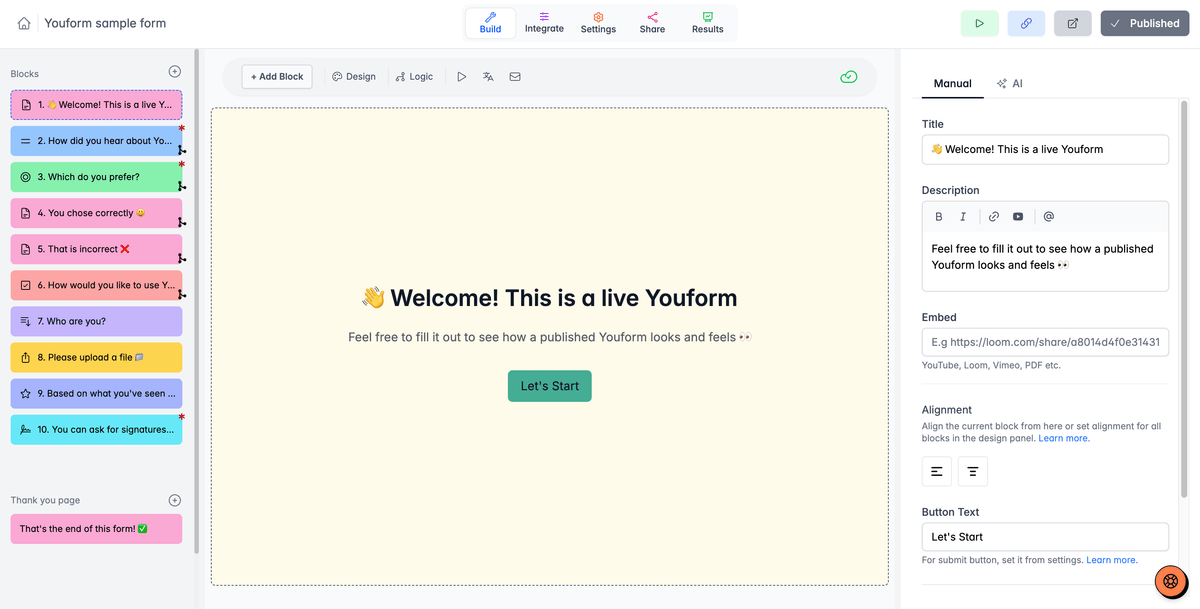
A Typeform lookalike with the pricing complaint removed: unlimited forms and responses on the free plan, including the one-question-at-a-time layout Typeform is known for. It is a small product from a small team, and the polish is a step behind. For a survey link you will share this week, that will not matter.
Visit YouformJotform
Most featuresThe feature-heavy veteran with a template for everything
Two decades of accumulated features: approval workflows, e-signatures, PDF generation, HIPAA options, and thousands of templates. The builder feels dated next to Tally, and the free plan caps monthly submissions. Pick it when the requirements list is long; regulated industries and ops-heavy teams end up here.
Visit JotformFormbricks
Best open sourceOpen-source surveys, in your app or on your servers
Open source, and you can run it on your own servers, which matters when responses cannot leave your infrastructure. It also does in-app micro-surveys: ask users one question at the moment they touch a feature. Developers and privacy-conscious teams should look here first.
Visit FormbricksFrequently asked questions
What is the best free form builder?
Tally has the strongest free plan among form builders: unlimited forms and unlimited responses, with payment only needed for extras like custom domains and removing the Tally badge. Youform matches the unlimited free responses in a Typeform-style layout. Jotform and Fillout have free tiers too, but with submission limits.
Is there a good free alternative to Typeform?
Youform is the closest match: it copies Typeform's one-question-at-a-time format and its free plan has no response cap. Tally covers the same jobs with a document-style editor instead of the conversational layout. Both are common picks for founders who outgrow Typeform's free plan.
Which form builder is best for surveys?
Typeform still produces the survey people are most likely to finish, with the deepest logic and design options of the mainstream tools. For surveys inside your own product, Formbricks can ask users a question at the moment they use a feature. For a quick one-off survey, Tally's free plan is enough.